Wednesday, 11 December 2019

Contact Form 7 Popup After Submit Form

Conatct Form 7 Popup message after submit form to setup much of way you can do that via custom code as well one plugin also available for it Popup message Contact form  7 . that provide much of feature available for popup message plugin contact form 7 success message modal . in that plugin used sweetalert js.
This also know Contact Form 7 Response Message Popup plugin for wordpress
Features:
Create Popup – Setup Popup for success and field Message
Pre-Define Template – Using Much of Pre-define template in popup
Customize Message – Popup Message Can be Customize Which you want that can be place
Customize Background color and image – You can be customize background color and background image
Customize font color – Its support Select, Radio, Checkbox, Input box, Range slider for calculation
Customize Button text and Background color – you can be customize color text and button for both
Customize Duration Time – In this you can customize how much time after hide popup that
Customize Background gradient colors – You can be use Gradient Color
Mobile Friendly – Popup is Fully Mobile Friendly
Compatible Browser – It support Much of web Browser

After Click on contact form 7 popup on button click its make to open popup to make mobile friendly . Close popup after send message in Contact Form 7 to there is time limit to setup popup close after some seconds
We can display popup after submit CF7 form so user can be make elegant look in website. Contact Form 7 Success/Error Response Output to customize by message which message you want to add that can be use.
Normally days Contact form 7 most using in wordpress site and much secure for us.

Contact Form 7 Custom Post Type Dropdown

Contact Form 7 Custom Post Type Dropdown for you can be make custom as well there you can be use plugin Custom Post type Dropdown Contact form 7  wordpress.org free plugin. Dynamic Post Contact form 7 to make form in much effective feature.
In this plugin its allow to setup much of feature see below that
  • beautiful drop-down-menues with post image, excerpt and meta data
  • selection of the post type (posts, pages, attachments, custom post types)
  • selection and limitation of categories (taxonomies)
  • customized/individual formatting of the label
  • configuring the value attribute
  • customized sorting of the post type
  • Display a search box on drop-down-menues
  • limitation of the post type based on its particular status (published, draft etc.)
Its also know as  contact form 7 – post fields
we using this for select2.js  who have customize for good idea they can be customize that part which allow by Dropdown Post list Contact form 7. mostly contact form 7 much popular in contact form 7 it can be make much prefer to setup.
As well this plugin allow with woocommerce feature with make product list price, Feature image so that is extra feature to setup it in woocommerce plugin.
it include order by date , random asc-desc as well if you want to show product or custom post product category wise than you can do it.
Search box - it can be allow to make search box of select2.js with Contact Form 7 Custom Post Type Dropdown. it can be find product as much as productive. if customer want to inquiry for product there need to select multiple product you can use that feature Dynamic Post Contact form 7 .

How to Setup Range Slider For Gravity Form

Range Slider for Gravity Form is make to slider more user friendly to visitor setup more effective user to get better response form visitor. In this Slider Gravity Forms to setup min/max value in slider so which range between setup visitor value it can be.
as well here we provider color selection option with Range Slider for Gravity Form .

Plugin Features
  • Easy use
  • Step Adding Option
  • Prefix On Digit
  • Multiple Tooltip Position
  • Tooltip color option
  • Min and Max Option in slider
  • Compatible in all major browser

How to Setup Plugin?

Go to wordpress.org and download Range Slider for Gravity Form

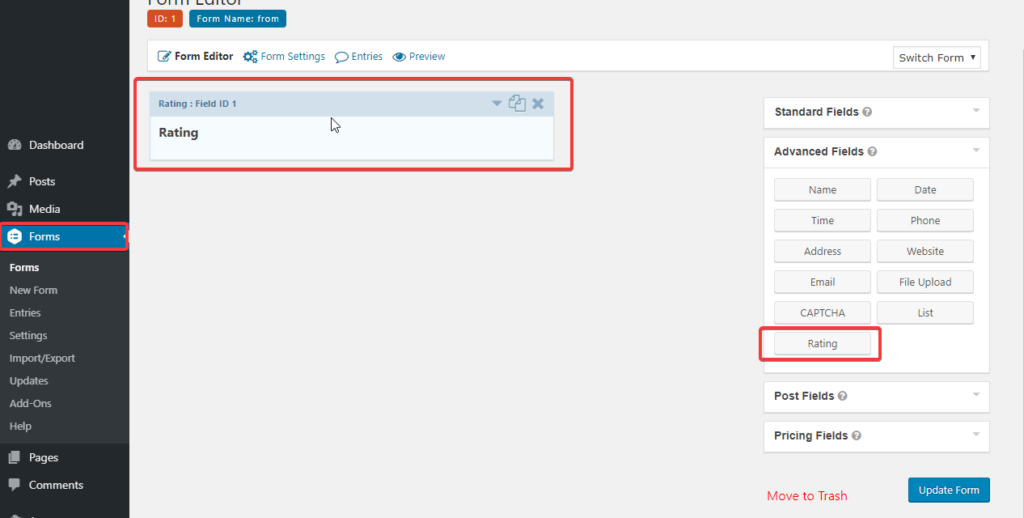
To Advanced Field under show Range slider Field for gravity form

Plugin Options

Min/Max  In range slider plugin this option to setup start and end limit value in slider gravity form
Prefix it can be allow to before number will be make Prefix value in slider
Prefix Position it can be make left and right position of prefix to where need to setup that
Step In Range slider Gravity Form this best option because much user want to setup step ex. if visitor want 5,10,15,16 like that option need to setup it can be
Color Tool tip it make tool tip under Gravity Form for slider
Tool tip Position if you want to keep tool tip position left, right, top ,bottom you can be slider in Range slider Gravity Form

Why Choose Gravity form Range Slider

Range Slider for Gravity Form should be use this because of this has much of amazing feature to color selection, tool tip, prefix position so we suggest to this plugin for that as well if you using contact form 7 than similar plugin for this you can use Price Calculator contact form 7

How to create custom post type in wordpress programmatically

Now day for blog site most popular CMS is that wordpress.com. There is very good Structure for content setup and make all seo friendly. Now if you go in there deeply there is Post, Media, Pages like that is by default create post type when you setup wordpress. If you want to make custom post type in wordpress you need to use plugin as well programmatically code.

How to create custom post type in wordpress programmatically

For create custom post type there is predefined function in wordpress.org  register_post_type() by that function you can be create custom post type in wordpress
Let we start how to make custom post type in wordpress
you should be follow below step for create custom post type.

Create a WordPress Custom Post Type Programmatically

For Example we create custom Post type of News
First you should open function.php of active theme (if i have avada theme active than open function.php of that theme)

/* Custom Post Type Start */
function create_posttype() {
register_post_type( 'news',
// CPT Options
array(
'labels' => array(
'name' => __( 'news' ),
'singular_name' => __( 'News' )
),
'public' => true,
'has_archive' => false,
'rewrite' => array('slug' => 'news'),
)
);
}
// Hooking up our function to theme setup
add_action( 'init', 'create_posttype' );
After put this code save function.php after that you will be show it on admin side see below screenshot
Custom post type Programically
Explanation for custom post type in wordpress programmatically
For making custom post type you much be use add_action('init') by that you need to post argument of that with register_post_type().

/*Custom Post type start xeeshop.com*/
function acw_post_type_newsa() {
$supports = array(
'title', // post title
'editor', // post content
'author', // post author
'thumbnail', // featured images
'excerpt', // post excerpt
'custom-fields', // custom fields
'comments', // post comments
'revisions', // post revisions
'post-formats', // post formats
);
$labels = array(
'name' => _x('news', 'plural'),
'singular_name' => _x('news', 'singular'),
'menu_name' => _x('news', 'admin menu'),
'name_admin_bar' => _x('news', 'admin bar'),
'add_new' => _x('Add New', 'add new'),
'add_new_item' => __('Add New news'),
'new_item' => __('New news'),
'edit_item' => __('Edit news'),
'view_item' => __('View news'),
'all_items' => __('All news'),
'search_items' => __('Search news'),
'not_found' => __('No news found.'),
);
$args = array(
'supports' => $supports,
'labels' => $labels,
'public' => true,
'query_var' => true,
'rewrite' => array('slug' => 'news'),
'has_archive' => true,
'hierarchical' => false,
);
register_post_type('news', $args);
}
add_action('init', 'acw_post_type_newsa');
/*Custom Post type end xeeshop.com*/


$supports: Indicates to the post type is compatible and supports all essential features.
$labels: Indicates to that the post type is referred properly to the admin area.
$args: Indicates to a permalink slug of the news, and a menu position located just beneath the Posts menu.

How to get custom post type data programmatically

Once, you have developed the code, your next task will be to create a new file called template-news.php and place it in your theme folder. As soon as you have created this file, add the following code to it.
/*Template Name: News*/
get_header();
query_posts(array(
   'post_type' => 'news'
));
while (have_posts()) : the_post(); ?>


After that create file you need to create and select template so you can be show good result as below screenshot
How to Create WordPress Custom Post Types

Frequently Bought Together For Woocommerce Plugin

Frequently Bought Together For Woocommerce is good plugin Can be use for add one product with another related products in woo-commerce cart.
Let’s consider For example,
If someone want to purchase product laptop. for purchase that related product is laptop bag as well mouse, keyboard for that like of it make Woocommmerce Combo Product. it also known as Frequently bought Product.

How to use Frequently Bought Together For Woocommerce

step 1 : For using this plugin you should download Frequently Bought Together For Woocommmerce from wordpress.org
step 2 : Go into product in product data section into show Frequently Added Tab
There will be show 4 Option
[caption id="attachment_2657" align="alignnone" width="1024"]Frequently Bought Together for WooCommerce Frequently Bought Together for WooCommerce[/caption]
Selected there will be show selected product there you can be add Relative Product Price if you want to keep fixed otherwise you can keep its Discounted.
Add Product this option in we should add product which you want to add with as relative product of current product, as before i suggest you example.
Layout you can be setup two layout
Heading text there is you can keep custom title example Combo Products Woocommerce 

Features of Frequently Bought Together Woocommerce

  • Creating bundles from simple products
  • Multiple Layout
  • Option to enable/disable Frequently Bought Together Plugin
  • Custom Place on working
  • Price Discount In Bulk
  • Ordering of Product Group
  • Creating bundles from product variations
  • Custom Position
  • Displaying bundles under a description and a product regular price
  • Unlimited number of suggested products for each single product
  • it working on as well variation Woocommerce product
  • Easy Integration

Shortcode For Frequently Bought Together

[Woo_Frequently_added]  you can be use this shortcode if you want to use anywhere Frequently together products.
We have Pro verstion for Woo Frequently Bought Together Pro  for this

woocommerce_quantity_input_max Filter

woocommerce_quantity_input_max this filter using with function woocommerce_quantity_input() . woocommmerce quantity max and min using with filter. if you want to setup min and max qty adding in cart than this filter is much useful for you.

How to work Woocommerce Quantity min and max

In theme of function.php you should be put woocommerce_quantity_input_max filter. if you want to use Code snippets than you can use that plugin
function woocommerce_quantity_input_max_callback( $max, $product ) {
$max = 5;
return $max;
}
add_filter( 'woocommerce_quantity_input_max', 'woocommerce_quantity_input_max_callback', 10, 2 );

There is $max = 5 there should be assign value of how much of max Quantity need to add. if you need to add max 10 qty than add $max = 10
If you need to setup particular Woocommerce product for need to setup max quantity than
add_filter( 'woocommerce_quantity_input_min', 'woocommerce_quantity_input_min', 10, 2 );
function woocommerce_quantity_input_min( $min, $product ){
if ( $product->get_id() == 108) {
$min = 2;
} else {
$min = 3;
}
return $min;
}
You need to just add if condition in that condition need to change product id

Filter defined in to following location(s).

/includes/wc-template-functions.php  
  1. 'max_value' => apply_filters( 'woocommerce_quantity_input_max', -1, $product ),
/templates/single-product/add-to-cart/grouped.php  
  1. 'max_value' => apply_filters( 'woocommerce_quantity_input_max', $grouped_product->get_max_purchase_quantity(), $grouped_product ),
/templates/single-product/add-to-cart/variation-add-to-cart-button.php  
  1. 'max_value' => apply_filters( 'woocommerce_quantity_input_max', $product->get_max_purchase_quantity(), $product ),
/templates/single-product/add-to-cart/simple.php  
  1. 'max_value' => apply_filters( 'woocommerce_quantity_input_max', $product->get_max_purchase_quantity(), $product ),

Related Action for this

woocommerce_quantity_input_classes
woocommerce_quantity_input_max
woocommerce_quantity_input_min
woocommerce_quantity_input_step
woocommerce_quantity_input_pattern
woocommerce_quantity_input_inputmode
woocommerce_quantity_input_args
If you need more powerful feature for this than you can be download Min and Max Quantity Rule For Woocommerce  Wordpress plugin there include user role, min and max qty as well category wise rustication you can be add. if you want to know How to Setup Min and Max Qty in Woocommerce  you can read that artical

Gravity forms star rating field

Gravity forms star rating field using to how to add rating field in gravity that suggest. this plugin is free to use with much of features. you can be see below feature of star rating gravity form .
Plugin Features
  • Easy use
  • Mobile Friendly
  • Multiple Icon in Gravity Form Star Rating
  • Ratting Title, Max star
  • Ratting step

How to using Gravity form Star Rating

Download plugin in wordpress.org Star Rating Gravity Form
Under Advanced Field use Rating Field
Gravity form star rating
Under rating field there is much of option avaible
Max star - how much star want to keep that showing under that plugin
Step star - it using to how much step of stare can
Star icon - there is different type of icon available in rating field
star rating gravity form

Cost Calculator Contact Form 7

Calculation of cost calculator in contact form 7 is clear, simple and best plugin to calculate field between each other fields in contact form 7
You can download Calculate contact form 7 plugin in to wordpress.org.
Demo of calculation
Download Cost Calculator contact form 7
See below video there  contact form 7 how to calculate field that indicates


Formula for contact form 7
EX-1   [calculator calculator-123 "Fieldname-1 + Fieldname-2 * (Fieldname-3 + Fieldname-4)"]
EX-2   [calculator calculator-900 "Fieldname-3 * Fieldname-4"]
EX-3(with prefix $)   [calculator calculator-959 Prefix:$ "Fieldname-3 * Fieldname-4"]
EX-4(sqrt)   [calculator calculator-265 "sqrt(Fieldname-1) ** Fieldname-2"]
EX-4(with prefix $ and Precision 2)   [calculator calculator-266 Prefix:$ Precision:2 " Fieldname-1 % Fieldname-2"]
Features
  • Easy use
  • Support all mathematical formulas
  • Creating forms with automatically calculated fields
  • Multi Total field
  • Add radio,checkbox , select price field
  • Cross browser’s compatible
  • Custom format total field
  • Finance calculators
  • Quote calculators
  • Booking cost calculators
  • Add one or more calculated fields
  • Hide calculated field and only send email
If you have any issue about Calculate Contact Form 7 than you can be contact on contact page

Tuesday, 10 December 2019

Price Calculator Contact form 7

Price Calculator Contact form 7 for much of plugin in available in wordpress.org but most popup plugin is Cost Calculator Contact form 7. because of this plugin has unbelievable feature in that plugins.

Demo

For Price Calculation below Feature available in calculate contact form 7

  • support all summation , dedication , multiply and division formulas
  • Customize format total
  • Additional support % = Find Modulus ex. 12 % 5 // 2, ** = Find power (^) ex. 3 ** 2 // 9, Sqrt = Find Square root ex. Sqrt(25) // 5
  • You can put Prefix on total
  • Range Slider Feature
  • One Total field
  • Make inputbox, radio , select , checkbox  price field
  • Cross browser’s compatible
  • Calculators Finance
  • Calculator Quote
  • Booking cost calculators
  • Compatible in all major browser
  • Easy use
  • Multi Total field
  • You can put Prefix with field wise


By this all feature to you can be easy to contact form 7 to convert cost calculator plugin for contact form 7. you can be use that for weight calculator, calorie calculator, quote calculator for hotel booking, car rental quote calculator, mortgage calculator, tax calculator, finance calculators.

For calculation documentation make to how to setup you can check via video and code so it make more elegant feature.

Wednesday, 27 November 2019

Contact form 7 Woocommerce Product List

Contact form 7 woocommerce product for dropdown setup in contact form 7 much better option for get Contact form 7 Woocommerce Product List plugin.
In Product And Custom Post type Dropdown CF7 plugin allow to setup product list drop down you can be setup it base on much of part like
Filter by Category , Tag, Feature Product, Best Selling Product
Allow multiple selections Select in that using select2.js
In that getting search box with product search in dropdown you can be enable and disable Contact form 7 woocommerce product . that is much useful with adding Woocommerce Product for Inquiry to supporting feature.
  • Product Dropdown Single Selection
  • Product Multiple selection
  • Product Variation Selector(Parent product single select, variation single select)
  • Field html id attribute
  • Field html class attribute
  • Required Field
  • Please watch the demo video for more information
  • Show product featured thumb image in dropdown
  • Show Price in dropdown

Price Calculator Contact form 7

Price Calculator Contact form 7 for much of plugin in available in wordpress.org but most popup plugin is Cost Calculator Contact form 7. because of this plugin has unbelievable feature in that plugins.
Demo
For Price Calculation below Feature available in calculate contact form 7
  • support all summation , dedication , multiply and division formulas
  • Customize format total
  • Additional support % = Find Modulus ex. 12 % 5 // 2, ** = Find power (^) ex. 3 ** 2 // 9, Sqrt = Find Square root ex. Sqrt(25) // 5
  • You can put Prefix on total
  • Range Slider Feature
  • One Total field
  • Make inputbox price field
  • Make radio price field
  • Make select box price field
  • Make checkbox price field
  • Cross browser’s compatible
  • Calculators Finance
  • Calculator Quote
  • Booking cost calculators
  • Compatible in all major browser
  • Easy use
  • Multi Total field
  • You can put Prefix with field wise

By this all feature to you can be easy to contact form 7 to convert cost calculator plugin for contact form 7. you can be use that for weight calculator, calorie calculator, quote calculator for hotel booking, car rental quote calculator, mortgage calculator, tax calculator, finance calculators.
For calculation documentation make to how to setup you can check via video and code so it make more elegant feature.

Tuesday, 9 July 2019

Post slider wordpress plugin free

Post slider wordpress plugin free for much of plugin available in wordpress.org to use custom post type. million of  people now days using wordpress cms for make website because there is lost of wordpress plugin as well wordpress theme available in market. so we can make easy way to using website mobile friendly and useful for visitor. for Post slider wordpress responsive  many of plugin available to give option like below feature
  • Filter by different post categories
  • Custom Post type allow
  • Owl carousel supported
  • Order by date, random, recent added avaible
  • Slider title , font color, font size, font align, font weight
  • Show/hide post title, post date, feature image, post description
  • Increase and decrease post description by length
  • Can be use placeholder image
  • Total posts, Per Row avaible
  • Responsive slider and mobile frienldy
  • Auto Play, Spacing Between two Post, Auto Play Timeout, Auto Play Hover Pause, Slider arrow
  • Mobile Per Row, Tablet Per Row
for Post slider wordpress plugin free for you need to use Post slider wordpress responsive   this plugin this is much powerful feature available in that is fully free plugin in wordpress.  it recommend best supporting system in post slider in wordpress free plugin  

Monday, 8 July 2019

Best Post Slider in WordPress Plugins

In wordpress Cms most of plugin is using free of cost. now a days post slider in wordpress most using plugins like that way in much of plugin available in wordpress.org but let me show you which is good plugin top 5 plugin in wordpress

Post Slider

Post Slider WordPress is a jQuery supper awesome carousel for your wordpress website. This plugin will enable awesome carousel. there is much of option available in that plugin i prefer that is most useful plugin  for post slider in wordpress .
we can use there custom post type slider and many other more option in post slider plugin
Download

Post Carousel – Post Grid, Filter & Masonry for WordPress

Post carousel is brought to you by Shaped Plugin. It is an amazing carousel plugin for WordPress that allows you to showcase your posts in a nice sliding manner. It has plenty of extremely user-friendly options to configure the carousel easily. It’s 100% responsive & columns structure, shortcode generator, control autoPlay speed, stop on hover carousel, multiple slideshows, mouse draggable on/off, easy to customize and stylize, unlimited color and styling options, RTL & translation ready, support all modern browsers and much more things to offer.
Download

WP Responsive Recent Post Slider

Perfect plugin to display your post on the blog. Comes with the clean and lightweight design. Responsive Recent WordPress Post Slider is a WordPress post slider plugin with compatibility for mobile devices. WordPress Recent Post Slider has included 4 designs with the beautiful slider. Other features are: Easy to add, given 4 designs, 100% responsive, responsive touch slider, mouse draggable, custom post type support, recent post slider with 25 designs and much more.
Download

Thursday, 27 June 2019

Post Slider in Wordpress

Posts Carousel in wordpress is most popular part in recently website. Wordpress in post slider most required part for this days. normally visitor prefer to see as much short content of website. so workdpress in post slider as well custom post slider for much of plugin available. in that case Post slider wordpress new and elegant design of plugin.
For Wordpress in post slider that plugin in much Feature Available
Install post slider in wordpress
Go in wordpress.org than search Post Slider or if not find that plugin than download Wordpress in post slider here.
If you in more details about post slider wordpress go there.

Feature of Post slider wordpress

  • Filter by different post categories
  • Custom Post type allow
  • Owl carousel supported
  • Order by date, random, recent added avaible
  • Slider title , font color, font size, font align, font weight
  • Show/hide post title, post date, feature image, post description
  • Increase and decrease post description by length
  • Can be use placeholder image
  • Total posts, Per Row avaible
  • Responsive slider and mobile frienldy
  • Auto Play, Spacing Between two Post, Auto Play Timeout, Auto Play Hover Pause, Slider arrow
  • Mobile Per Row, Tablet Per Row

HOW IT WORKS POST SLIDER IN WORDPRESS


If you want to need any new feature or any question than you can email on aradadiya163@gmail.com
Pay me some, I will help you for CSS Issue Personally CLICK HERE….

Tuesday, 25 June 2019

Calculated Fields contact form 7 in Wordpress

In this tutorial we explain me how to setup calculated field in contact form 7 for this.
we need to setup value and label both for Select box, radio button, checbox as well text field.
Technically we use Calculated Fields contact form 7 for contact form 7 calculate price Wordpress plugin. For this you not need to use jquery understanding or anything code understanding for this just need to use in Calculate Contact Form 7  plugin from wordpress.org.

How to setup calculated fields contact form 7

For this you need to download  plugin from wordpress.org or Calculated Fields contact form 7  this link.


Just see this Calculated Fields contact form 7  Video and install plugin to it will setup is contact form 7 calculate price in contact form 7
If you want to need any new feature or any question than you can email on aradadiya163@gmail.com
Pay me some, I will help you for CSS Issue Personally CLICK HERE….

Thursday, 20 June 2019

How to Setup Min and Max Qty in Woocommerce

Now a days for e-commerce platform woocommerce is most popular platform for that. For woocommerce many time seller need to do Min and Max Qty Rule in woocommerce. For that Min and Max Quantity Rule Woocommerce best addon for that to give much of future.
Feature of Min Max Qty rule:
  • Product Category base Min and Max rule
  • Single Product Base on Min and Max rule
  • Woocommerce Cart base Min and Max Qty Rule
  • Woocommerce User Role Min and Max rule
How to use Min and Max Rule Woocommerce
Step : 1
Download Min and Max Quantity Rule Woocommerce Plugin and Active plugin in your website.
Step : 2
For Woocommerce product Min and Max rule go to product and edit product


Step : 3
For Woocommerce Category Min and Max rule go to product category and edit product category
Step : 4
For Woocommerce Cart Min and Max rule go to product tab under Cart Rule there you can add qty

Step : 5
For Woocommerce User Role Min and Max rule for product edit time and product category edit time it showing
If you want to need any new feature or any question than you can email on aradadiya163@gmail.com
Pay me some, I will help you for CSS Issue Personally CLICK HERE….

How To auto Calculate Contact Form 7 field as cost calculator

we provide this tutorial for how to Calculate Contact Form 7 field automatically.
First a follow you need to install below plugin for it
Step 1:
Plugin : Calculate Contact Form 7
Step 2:
We need to add some number field which need to calculate field see this demo http://oceanwebguru.com/calculator/

Step : 3
in there is is button of calculator . if you click that than there will be show calculating field option Calculate Contact Form 7

Step : 4
After that you need to add Formulas there like summation, multiplication,  dedication as we division.
you can use formulas like below:
♦ EX-1   [calculator calculator-123 "Fieldname-1 + Fieldname-2 * (Fieldname-3 + Fieldname-4)"]
♦ EX-2   [calculator calculator-900 "Fieldname-3 * Fieldname-4"]
♦ EX-3(with prefix $)   [calculator calculator-959 Prefix:$ "Fieldname-3 * Fieldname-4"]
you can also use prefix on that currency symbol or any another prefix text.
this plugin easy to use calculate cost formula as well Cost Calculate Contact Form 7
we describe more feature here
Calculate Contact Form 7 a clean, simple quote / project price / estimation plugin for your website
If you want to need any new feature or any question than you can email on aradadiya163@gmail.com
Pay me some, I will help you for CSS Issue Personally CLICK HERE….

How to use Post Slider in wordpress

Now days for attractive webdesign for using slider that for we realize wordpress post for make easy look we make post slider wordpress not only for blog we make custom post slider for wordpress
For this part you need use use Post Slider wordpress plugin . download from wordpress site
Feature:
  • Filter by different post categories
  • Custom Post type allow
  • Owl carousel supported
  • Order by date, random, recent added avaible
  • Slider title , font color, font size, font align, font weight
  • Show/hide post title, post date, feature image, post description
  • Increase and decrease post description by length
  • Can be use placeholder image
  • Total posts, Per Row avaible
  • Responsive slider and mobile frienldy
  • Auto Play, Spacing Between two Post, Auto Play Timeout, Auto Play Hover Pause, Slider arrow
  • Mobile Per Row, Tablet Per Row

How to use Post Slider Steps

Step : 1
Download Post slider wordpress Plugin and Active plugin in your website.
Step : 2
Go to Post Carousel > Add New
Than config setting as per requirement

Than put shortcode where you want to put there.
If you want to need any new feature or any question than you can email on aradadiya163@gmail.com
Pay me some, I will help you for CSS Issue Personally CLICK HERE….

How to setup Instagram Gallery Wordpress

Now a days in social media popular platform like facebook , intagram as well twitter. but normally for product selling much using gallery is instagram gallery.
For instragram gallery much of plugin available in wordpress.org. But Easy and best option for gallery that for have Instagram Gallery Wordpress.
You can see plugin demo Instagram Gallery Wordpress here

How to use Instgram Gallery in Wordpress plugin

Step : 1
Install Instagram Gallery & Sliderin your Website
Step : 2
Go to Settings > Instagram Slider
after that you need to create access token . for that go here : get access token

Copy that code and paste in Access Token field in plugin setting
Step : 3
Instagram Gallery plugin have two option for layout
  1. Grid
  2. Carousel
You can choose any one option from there . see below setting of that screenshot:

After this step all configuration is done.
Step : 4
now where you want to show Instagram gallery or Carousel than copy short code any paste .
Shortcode is below
[ocinsta-carousel]

If you want to need any new feature or any question than you can email on aradadiya163@gmail.com
Pay me some, I will help you for CSS Issue Personally CLICK HERE….

How to Use Cf7 Product And Custom Post List Dropdown

Contact form 7 Product And Custom Post List Drop-down useful for submit any particular post or product about inquire in woocommerce or post in inquire .
Demo for Contact form 7 Product And Custom Post List Drop-down
Feature:
  • Easy Install
  • Custom Post list dropdown with Feature image, Post title
  • Woocommerce product list with feature image , product price, product title
  • Filter by Category, Tag, Feature Product, Best Selling Product
  • Allow multiple selections
  • Order By Date, Order by post ID, Author, Random
  • Enable and disable Search box on List Dropdown.
  • Custom Post Type Supported
  • Compatible in all major browser
  • Woocommerce Supported
How to use Cf7 Product And Custom Post List Dropdown :
Step : 1
Download Contact form 7 Product And Custom Post List Drop-down Plugin.
Step : 2
For WooCommerce Products drop-down menu option for inquire or list for woocommerce  product.
For Posts drop-down menu option for inquire or list for blog or custom post list .

Step : 3
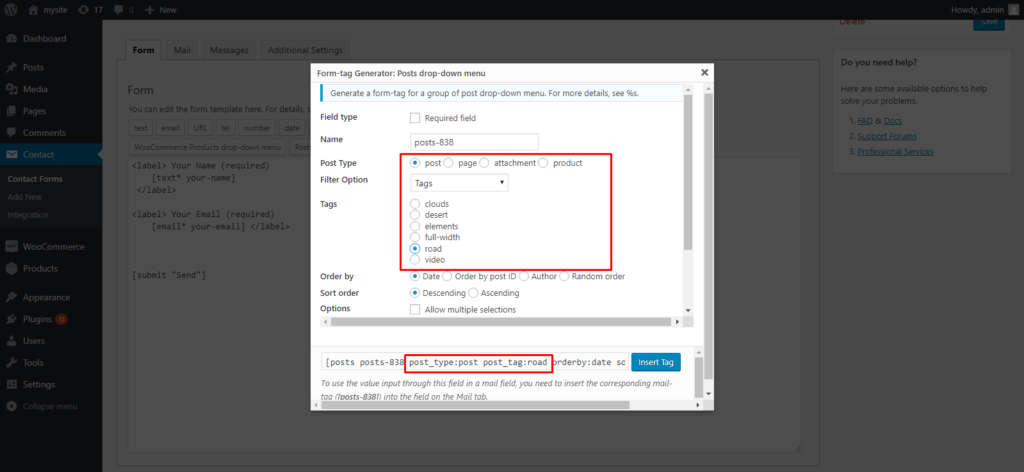
Form-tag Generator: WooCommerce Products drop-down menu allow you Filter by Category, Tag, Feature Product, Best Selling Product.
same as Form-tag Generator: Posts drop-down menu allow you to Filter by Category, Tag, Feature Product, Best Selling Product

there is also multiple option available in woocommerce product inquire contact form 7 and custom post inquire contact form 7 .
If you want to need any new feature or any question than you can email on aradadiya163@gmail.com
Pay me some, I will help you for CSS Issue Personally CLICK HERE….