Thursday, 27 June 2019

Post Slider in Wordpress

Posts Carousel in wordpress is most popular part in recently website. Wordpress in post slider most required part for this days. normally visitor prefer to see as much short content of website. so workdpress in post slider as well custom post slider for much of plugin available. in that case Post slider wordpress new and elegant design of plugin.
For Wordpress in post slider that plugin in much Feature Available
Install post slider in wordpress
Go in wordpress.org than search Post Slider or if not find that plugin than download Wordpress in post slider here.
If you in more details about post slider wordpress go there.

Feature of Post slider wordpress

  • Filter by different post categories
  • Custom Post type allow
  • Owl carousel supported
  • Order by date, random, recent added avaible
  • Slider title , font color, font size, font align, font weight
  • Show/hide post title, post date, feature image, post description
  • Increase and decrease post description by length
  • Can be use placeholder image
  • Total posts, Per Row avaible
  • Responsive slider and mobile frienldy
  • Auto Play, Spacing Between two Post, Auto Play Timeout, Auto Play Hover Pause, Slider arrow
  • Mobile Per Row, Tablet Per Row

HOW IT WORKS POST SLIDER IN WORDPRESS


If you want to need any new feature or any question than you can email on aradadiya163@gmail.com
Pay me some, I will help you for CSS Issue Personally CLICK HERE….

Tuesday, 25 June 2019

Calculated Fields contact form 7 in Wordpress

In this tutorial we explain me how to setup calculated field in contact form 7 for this.
we need to setup value and label both for Select box, radio button, checbox as well text field.
Technically we use Calculated Fields contact form 7 for contact form 7 calculate price Wordpress plugin. For this you not need to use jquery understanding or anything code understanding for this just need to use in Calculate Contact Form 7  plugin from wordpress.org.

How to setup calculated fields contact form 7

For this you need to download  plugin from wordpress.org or Calculated Fields contact form 7  this link.


Just see this Calculated Fields contact form 7  Video and install plugin to it will setup is contact form 7 calculate price in contact form 7
If you want to need any new feature or any question than you can email on aradadiya163@gmail.com
Pay me some, I will help you for CSS Issue Personally CLICK HERE….

Thursday, 20 June 2019

How to Setup Min and Max Qty in Woocommerce

Now a days for e-commerce platform woocommerce is most popular platform for that. For woocommerce many time seller need to do Min and Max Qty Rule in woocommerce. For that Min and Max Quantity Rule Woocommerce best addon for that to give much of future.
Feature of Min Max Qty rule:
  • Product Category base Min and Max rule
  • Single Product Base on Min and Max rule
  • Woocommerce Cart base Min and Max Qty Rule
  • Woocommerce User Role Min and Max rule
How to use Min and Max Rule Woocommerce
Step : 1
Download Min and Max Quantity Rule Woocommerce Plugin and Active plugin in your website.
Step : 2
For Woocommerce product Min and Max rule go to product and edit product


Step : 3
For Woocommerce Category Min and Max rule go to product category and edit product category
Step : 4
For Woocommerce Cart Min and Max rule go to product tab under Cart Rule there you can add qty

Step : 5
For Woocommerce User Role Min and Max rule for product edit time and product category edit time it showing
If you want to need any new feature or any question than you can email on aradadiya163@gmail.com
Pay me some, I will help you for CSS Issue Personally CLICK HERE….

How To auto Calculate Contact Form 7 field as cost calculator

we provide this tutorial for how to Calculate Contact Form 7 field automatically.
First a follow you need to install below plugin for it
Step 1:
Plugin : Calculate Contact Form 7
Step 2:
We need to add some number field which need to calculate field see this demo http://oceanwebguru.com/calculator/

Step : 3
in there is is button of calculator . if you click that than there will be show calculating field option Calculate Contact Form 7

Step : 4
After that you need to add Formulas there like summation, multiplication,  dedication as we division.
you can use formulas like below:
♦ EX-1   [calculator calculator-123 "Fieldname-1 + Fieldname-2 * (Fieldname-3 + Fieldname-4)"]
♦ EX-2   [calculator calculator-900 "Fieldname-3 * Fieldname-4"]
♦ EX-3(with prefix $)   [calculator calculator-959 Prefix:$ "Fieldname-3 * Fieldname-4"]
you can also use prefix on that currency symbol or any another prefix text.
this plugin easy to use calculate cost formula as well Cost Calculate Contact Form 7
we describe more feature here
Calculate Contact Form 7 a clean, simple quote / project price / estimation plugin for your website
If you want to need any new feature or any question than you can email on aradadiya163@gmail.com
Pay me some, I will help you for CSS Issue Personally CLICK HERE….

How to use Post Slider in wordpress

Now days for attractive webdesign for using slider that for we realize wordpress post for make easy look we make post slider wordpress not only for blog we make custom post slider for wordpress
For this part you need use use Post Slider wordpress plugin . download from wordpress site
Feature:
  • Filter by different post categories
  • Custom Post type allow
  • Owl carousel supported
  • Order by date, random, recent added avaible
  • Slider title , font color, font size, font align, font weight
  • Show/hide post title, post date, feature image, post description
  • Increase and decrease post description by length
  • Can be use placeholder image
  • Total posts, Per Row avaible
  • Responsive slider and mobile frienldy
  • Auto Play, Spacing Between two Post, Auto Play Timeout, Auto Play Hover Pause, Slider arrow
  • Mobile Per Row, Tablet Per Row

How to use Post Slider Steps

Step : 1
Download Post slider wordpress Plugin and Active plugin in your website.
Step : 2
Go to Post Carousel > Add New
Than config setting as per requirement

Than put shortcode where you want to put there.
If you want to need any new feature or any question than you can email on aradadiya163@gmail.com
Pay me some, I will help you for CSS Issue Personally CLICK HERE….

How to setup Instagram Gallery Wordpress

Now a days in social media popular platform like facebook , intagram as well twitter. but normally for product selling much using gallery is instagram gallery.
For instragram gallery much of plugin available in wordpress.org. But Easy and best option for gallery that for have Instagram Gallery Wordpress.
You can see plugin demo Instagram Gallery Wordpress here

How to use Instgram Gallery in Wordpress plugin

Step : 1
Install Instagram Gallery & Sliderin your Website
Step : 2
Go to Settings > Instagram Slider
after that you need to create access token . for that go here : get access token

Copy that code and paste in Access Token field in plugin setting
Step : 3
Instagram Gallery plugin have two option for layout
  1. Grid
  2. Carousel
You can choose any one option from there . see below setting of that screenshot:

After this step all configuration is done.
Step : 4
now where you want to show Instagram gallery or Carousel than copy short code any paste .
Shortcode is below
[ocinsta-carousel]

If you want to need any new feature or any question than you can email on aradadiya163@gmail.com
Pay me some, I will help you for CSS Issue Personally CLICK HERE….

How to Use Cf7 Product And Custom Post List Dropdown

Contact form 7 Product And Custom Post List Drop-down useful for submit any particular post or product about inquire in woocommerce or post in inquire .
Demo for Contact form 7 Product And Custom Post List Drop-down
Feature:
  • Easy Install
  • Custom Post list dropdown with Feature image, Post title
  • Woocommerce product list with feature image , product price, product title
  • Filter by Category, Tag, Feature Product, Best Selling Product
  • Allow multiple selections
  • Order By Date, Order by post ID, Author, Random
  • Enable and disable Search box on List Dropdown.
  • Custom Post Type Supported
  • Compatible in all major browser
  • Woocommerce Supported
How to use Cf7 Product And Custom Post List Dropdown :
Step : 1
Download Contact form 7 Product And Custom Post List Drop-down Plugin.
Step : 2
For WooCommerce Products drop-down menu option for inquire or list for woocommerce  product.
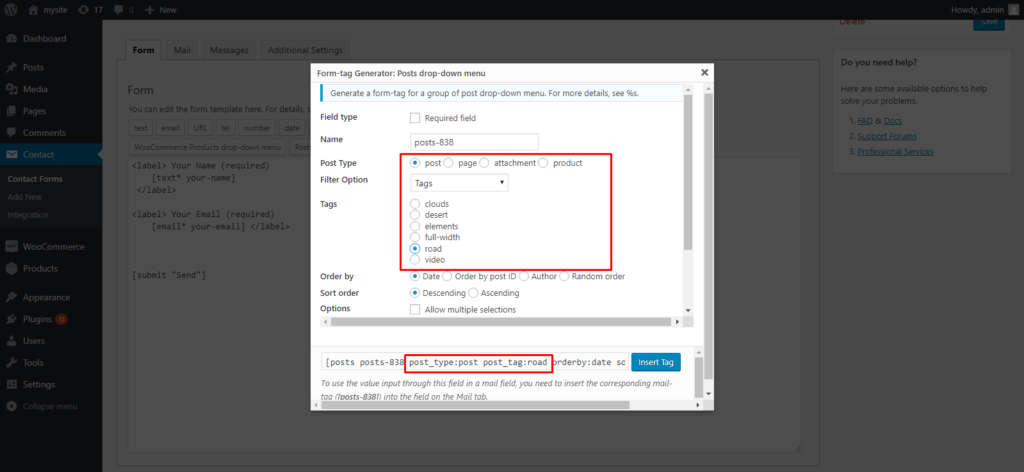
For Posts drop-down menu option for inquire or list for blog or custom post list .

Step : 3
Form-tag Generator: WooCommerce Products drop-down menu allow you Filter by Category, Tag, Feature Product, Best Selling Product.
same as Form-tag Generator: Posts drop-down menu allow you to Filter by Category, Tag, Feature Product, Best Selling Product

there is also multiple option available in woocommerce product inquire contact form 7 and custom post inquire contact form 7 .
If you want to need any new feature or any question than you can email on aradadiya163@gmail.com
Pay me some, I will help you for CSS Issue Personally CLICK HERE….